• 0 Shopping Cart
  • Account
    • Login
    • Register
    • Forgot Password?
  • Home
  • Store
    • Browse All
    • Shared Hosting
    • Reseller Hosting
    • WordPress Hosting
    • Cloud Hosting
    • VPS Server
    • SSL Certificates
    • VPN
    • Website Backup
    • Website Security
    • E-mail Services
    • Professional Email
    • SEO Tools
    • Register a New Domain
    • Transfer Domains to Us
  • Announcements
  • Knowledgebase
  • Network Status
  • Affiliates
  • Contact Us
  • More

Knowledgebase

Start your website today with reliable, affordable shared hosting
— designed for speed, simplicity, and 24/7 support.

  1. Portal Home
  2. Knowledgebase
  3. PayPal
  4. How to Pay an Invoice Without Having Paypal Account

  Categories

Backup/Restore
4
DNS - Nameservers
5
Installing a Control Panel
6
Others
3
PayPal
7
Security
10
WordPress
16
Databases
12
Domain Management
9
Email
5
FTP
9
Mail Filters & SPAM
8
Mobile
12
Softaculous
3
SSL
5

  Categories

  Tag Cloud

123-reg access account accounts alias android any apache backups based box cpanel create database delete dns domain edit email emails enable export external fight filter forwarders ftp generate global godaddy how level logicboxes msql name namecheap netearthone optimize page partial phpmyadmin redirect registrars remove rename repair restore send servers setup spam spamassasin spambox subdomain subdomains table traooer update url user webmail website

  Support

My Support Tickets
Announcements
Knowledgebase
Downloads
Network Status
Open Ticket

How to Pay an Invoice Without Having Paypal Account Print

  • 0

You can pay without having a PayPal Account by using a Debit or Credit Card.


1. Log in to your hosting client area.

2. Go to the invoice section and open your unpaid invoice.


3. Click on PayPal Check Out.

261_paypal-checkout-button.gif


4. Scroll down and click on Pay with Debit or Credit Card.
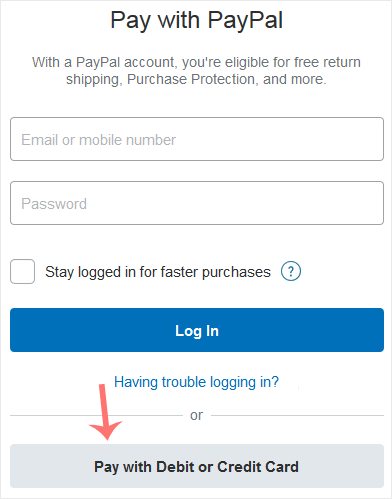
262_paypal-pay-via-debit-or-credit-card.gif


5. Enter your debit or credit card details, billing address, and other related information. Then click on Pay Now.



Was this answer helpful?

Related Articles

How to Subscribe to an Invoice via PayPal You can subscribe to an invoice for recurring payments. The subscription option is only available... How to Check Automatic PayPal Subscriptions You can view the list of automatic PayPal subscriptions you have.   1. Log in to your PayPal... How to Cancel an Automatic PayPal Subscription You can cancel pre-approved, automatic payments, or a subscription in your PayPal account.   1.... How to Link a Debit or Credit Card to Your PayPal Account Follow this tutorial to link your Debit or Credit Card to your PayPal Account.   1. Log in to... How to Remove a Debit or Credit Card From PayPal Follow this tutorial to remove your Debit or Credit Card from your PayPal account.   1. Log in...
« Back

  Tag Cloud

123-reg access account accounts alias android any apache backups based box cpanel create database delete dns domain edit email emails enable export external fight filter forwarders ftp generate global godaddy how level logicboxes msql name namecheap netearthone optimize page partial phpmyadmin redirect registrars remove rename repair restore send servers setup spam spamassasin spambox subdomain subdomains table traooer update url user webmail website

  Support

My Support Tickets
Announcements
Knowledgebase
Downloads
Network Status
Open Ticket

We offer a wide range of reliable hosting solutions tailored to meet your specific needs, ensuring a seamless online experience for your website visitors.

Our Services

  • Shared Hosting
  • WordPress Hosting
  • Cloud Hosting
  • Reseller Hosting
  • Virtual Private Servers
  • Dedicated Server
  • Domain Registration

Email & Security

  • Email Security
  • Sitelock Malware
  • OS App Suite
  • CodeGuard Backup
  • NordVPN
  • SSL Certificates

Community

  • About FastLane Servers
  • Announcements
  • Our Blog
  • Knowledge Base
  • Affiliates
  • Network Status

Contact Us

  • PO BOX 331 Baytown, TX 77521 United States

  • (309) FAST-ONE
  • info@fastlaneservers.com

Copyright © 2026 FastLane Servers. All Rights Reserved.


Loading...
Loading...
Choose language
العربية
Azerbaijani
Català
中文
Hrvatski
Čeština
Dansk
Nederlands
English
Estonian
Persian
Français
Deutsch
עברית
Magyar
Italiano
Macedonian
Norwegian
Português
Português
Română
Русский
Español
Svenska
Türkçe
Українська

Generate Password

Please enter a number between 8 and 64 for the password length